


One connected workspace
Your team needs a practical way to share information, work together, and keep business moving. Nextcloud Hub brings file management, document collaboration, communication, and scheduling into one connected workspace, with the flexibility to choose where your data lives.
Built on an open-source platform, Nextcloud Hub can run on your own infrastructure or with a hosting provider you select. It gives your organization more control over its digital workplace while keeping everyday collaboration accessible.
Make collaboration part of your workflow.
A project rarely happens in one application. Someone shares a file, another person schedules a meeting, and the team exchanges messages before making changes to a document.
Nextcloud Hub connects those activities. Its modular platform brings together Files, Talk, Groupware, Office, Assistant, and Flow, so you can build a workspace around the capabilities your organization needs.
For your business, that creates an opportunity to simplify how people find information, communicate, and move work forward.
 Nextcloud Files
Nextcloud Files offers a self-hosted file storage and sync platform with powerful collaboration capabilities with desktop, mobile and web interfaces.
- Powerful and flexible file sharing and management
- Access from anywhere with web, desktop and mobile interface
- Advanced security with encryption, rule-based file access control and more
- Deep integration with all your productivity apps and external systems
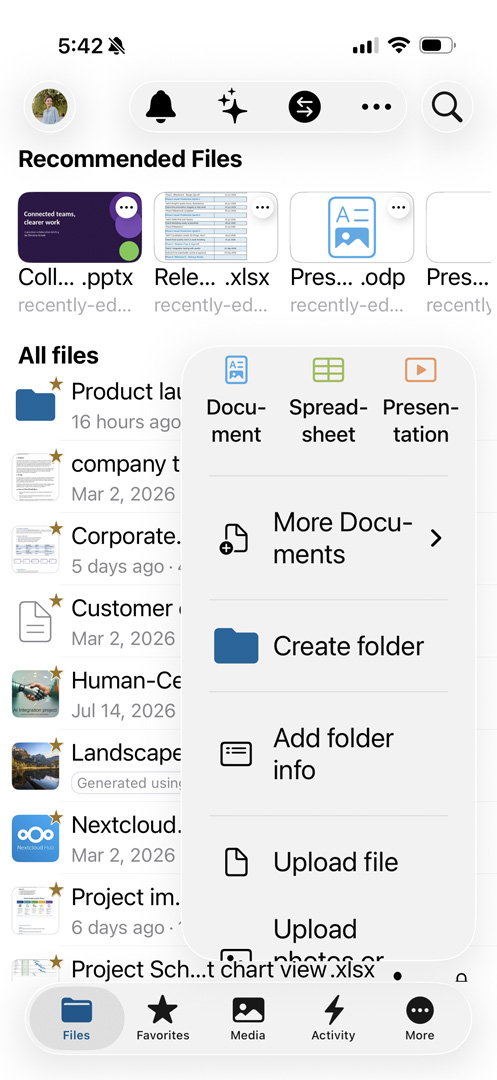
Keep your information organized and within reach.
Your files should be easy to find, straightforward to share, and accessible when work takes you away from your desk.
Nextcloud Files provides file storage, synchronization, and sharing through web, desktop, and mobile interfaces. Teams can work from a shared environment while administrators manage access and sharing controls.
Use it to:
- Organize business documents and project files.
- Synchronize information across supported devices.
- Share files with colleagues and outside collaborators.
- Apply access controls appropriate to your organization.
Whether you are exchanging client documents or coordinating internal projects, Files gives your team a central place to work with business information.
Sharing and protection options depend on your configuration.
Explore File SharingChoose where your workspace runs.
Your organization's requirements should guide its hosting decisions. Nextcloud Hub supports on-premises, provider-hosted, and hybrid deployment approaches.
On your infrastructure
Operate the platform within an environment your organization manages.
With a hosting provider
Choose a provider whose services, location, and support fit your requirements.
Across a hybrid environment
Plan a deployment that connects selected infrastructure and services.
Nextcloud also supports integrations, open APIs, and identity-management options such as LDAP, Active Directory, single sign-on, and two-factor authentication. Availability and setup vary by environment.
Build the workspace around your business.
The right implementation starts with how your people work.
For a professional services firm, the priority may be organizing client documents and controlling external access. For a distributed team, it may be making shared information easier to reach. For an operations department, it may be connecting documents, conversations, and recurring processes.
A practical implementation should address:
People
Who needs access, and what should they be able to do?
Information
Which files and records belong in the workspace?
Processes
Where do delays, duplicate work, or unclear handoffs occur?
Infrastructure
What capacity, integrations, and support will be required?
Continuity
How will backups, recovery, maintenance, and employee transitions be handled?
These decisions help turn a software deployment into a workspace people can use confidently.
Start with a focused implementation.
You do not need to introduce every capability at once. A phased rollout gives your team time to learn and helps identify issues before expanding.
Assess your current environment.
Review existing tools, information, users, and requirements.
Define the first use case.
Choose a clear starting point, such as internal file sharing.
Configure and test.
Validate access, integrations, performance, and recovery procedures.
Pilot with a small group.
Gather feedback from employees doing real work.
Train and expand.
Introduce additional capabilities as the organization is ready.
Build a workspace that works for your team.
Start with the way your business shares information, coordinates people, and completes work. Then choose the Nextcloud Hub capabilities and deployment approach that support those needs.